01 / PLUGINSMADE FOR THE WORK
LESS CLICKING.
MORE MOTION.
Tools I built to make the everyday bits of motion design move faster.
AFTER EFFECTS · WINDOWS
MOTION
DOCK.
Your timeline, with fewer detours.
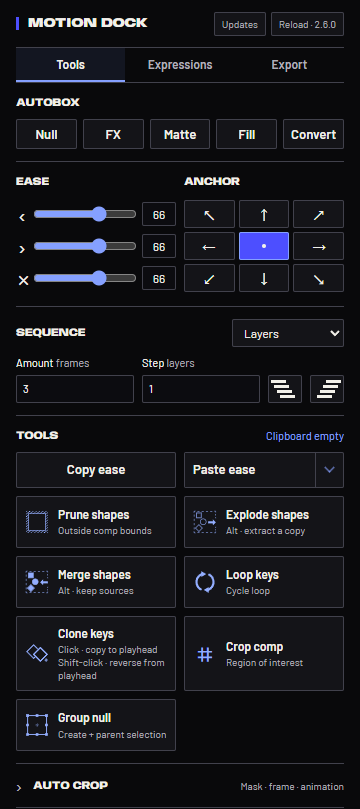
Ease and anchor controls, shape tools, useful expressions and exports — together in a compact, dockable panel.
VERSION 2.6.0AE 2026
Download for Windows ↘ZIP installer · Anybody + Barlow fonts included
How to install ↓THE PANELTOOLS / EXPRESSIONS / EXPORT
SMALL PANEL. LESS BACK AND FORTH.01Shape the motion.
Ease, anchor points, grouped sequencing, key cloning and ease copy/paste.
02Keep it together.
Autobox, shape controllers, explode, merge, prune and automatic cropping.
03Build. Then export.
Expression presets, editable counters, master controls, pre-renders, WAV stems and ROI patches.
GET STARTED
INSTALL ONCE.
KEEP MOVING.
Made for After Effects 2026 on Windows.
- Download and extract the ZIP.
Keep the full Motion Dock folder together.
- Run Install Motion Dock.cmd.
It installs for your Windows account and enables Adobe’s unsigned local extension setting.
- Restart After Effects.
Open Window → Extensions (Legacy) → Motion Dock, then dock the panel.
- Get updates from the panel.
Motion Dock checks for published releases. Use Updates → Install when you’re ready. Local settings, expressions and ROI records stay on that computer.
LATEST RELEASE
WHAT’S NEW.
- Signed website releases and in-panel updates.
- ROI patches, pre-rendering and audio stems in Export.
- Anybody and Barlow fonts included.